Translate




Decide which permit(s) you need for your project
| Agricultural Exemption | for new, or updates to, agricultural buildings for farm use, equine and marijuana, and storage buildings related to forestry. (Make sure you review the criteria for EXEMPT structures.) NOTE: If an exemption is approved, no inspections are required. |
|---|---|
| Commercial | for constructing or altering a commercial building or commercial space. Multiple permits are often required. Please see below list of potential permits needed for a project.
Note: "Site work" for new water, sewer or storm located in the Public Right of Way or in a public easement, will require a Development Engineering permit. |
| Grading | for changing the slope or grade of your property by backfill or excavation |
| Manufactured Dwelling | for placement only of, mobile homes, trailers or manufactured homes. For additions and updates a building permit is required. |
| Renewable Energy | related to solar energy, water efficiency and other renewable energies. |
| Single Family Residential or Duplex | Multiple permits are required for the construction of a new single-family residential home or duplex, or in most situations for an addition or modification to a single-family residential home or dupplex. The One & Two Family Dwelling Checklist provides additional guidance on the information and documents needed. |
Contact Planning and Septic
After you decide which permit is right for you, connect with County Planning, or for our partner jurisdictions the cities of Canby, Gladstone and Molalla, to understand the land use requirements, necessary permits and submittals for your project. (You can check your jurisdiction by using CMap to search for an address). If your project will use a septic system (including revising or adding capacity to an existing system), also check with County Septic about the requirements prior to developing your project plans and documents. Failure to coordinate with Planning and Septic prior to submitting an application could substantially extend review times or lead to your submittal being rejected during Planning or Septic review.
Prepare your site plan
As part of your building permit application you must submit a site plan. The site plan can be created by the project architect, engineer, or designer, or you can use this example site plan and template to draw your proposed development then convert it to a PDF format. This plan must show all of the items listed below (where relevant).
Items to include in a Site Plan
- Applicant's name and address
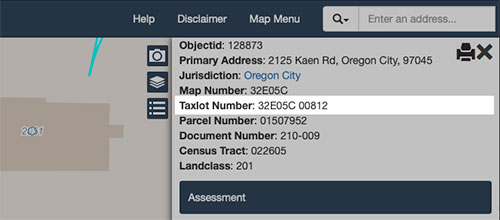
- Legal description of the property (Township, Range, Section and Tax Lot) You can copy the Taxlot Number from CMap by search for the address. (Example: 32E05C 00812)
- Direction of north
- Driveway location and location of adjacent streets
- Proposed and existing structures
- Location of any existing wells on this or adjacent properties (if not on public water)
- Location of the septic tank, drainfield, and drainfield replacement area (if not on public sewer)
- Approximate ground slope and direction of the slope
- Proposed setbacks from all property lines
- Position of all creeks, streams, ponds, springs, or other drainage-ways
- Relative elevations at lot corners or construction area, and at the building site
Prepare your drawings and documents
You'll need to submit project drawings and documents. The guidelines on the Development Direct webpage provide information on how to prepare and submit your project plans and documents.
Please note:
- All documents must be sent as PDFs.
- Plans must be legible, and to scale with correct dimensions.
- Plans and drawings must be in landscape/horizontal orientation.
- If you need help scanning your drawings, a local printing shop may be able to help.
- All drawings and documents must use the County naming conventions as provided on the Development Direct webpage.
Submit and manage your project
After you determine what permits you need, connect with Planning and Septic (if needed), and prepare your drawings and documents, you are ready to submit in Development Direct. You will use Development Direct to respond to reviewer comments and monitor the progress of your project. The User Guide provides information on how to perform these tasks in the system.
- It takes up to 10 business days for initial pre-screen/intake review of your permit documents before your project is set-up in the system.
- Plan review takes three to seven weeks, depending on the complexity of the project.
- Watch your Development Direct account for information regarding payments, requests for additional information and for when to download your approved drawings.
Receive permits and download drawings
When your project is approved and your permits are ready, you will receive your permits and approved drawings directly in Development Direct. Print a color copy of all approved plans, documents, and permits, and be sure to have these documents on-site for inspections. Your plans will be permanently stored in Development Direct, so if they are lost or destroyed later on, you can log in and download them again.
Begin work and call for your inspections
There are 3 convenient ways to schedule an inspection.



Answers to common questions.
Email: bldservice@clackamas.us
Phone: 503-742-4240
Customer Service Hours
Monday to Thursday
8 a.m. to 4 p.m.
Development Services Building
150 Beavercreek Road
Oregon City, OR 97045